CRM for Tradies – Why You Need One and How to Pick the Right One
Your phone rings while you’re elbow-deep in a ceiling cavity. You miss the call. You tell yourself you’ll call them back at lunch. Lunch turns into 3pm. 3pm turns into tomorrow. Tomorrow turns into never.
That lead is gone. And you probably don’t even know it existed.
This is the reality for most trade businesses. Not because they’re lazy – because they’re busy. And busy without a system means leads fall through the cracks every single day.
A CRM fixes that. But not the way most people think.
What Is a CRM? (And What It Isn’t)
CRM stands for Customer Relationship Management. In plain terms, it’s software that tracks every person who contacts your business – from their first enquiry through to the completed job and beyond.
Here’s what a CRM does:
- Records every lead that comes in (phone, form, email, Facebook)
- Tracks where that lead is in your pipeline (new, quoted, follow-up needed, won, lost)
- Automates follow-ups (texts, emails) so leads don’t go cold
- Stores all communication history in one place
- Gives you visibility over what’s happening in your business
Here’s what a CRM is NOT:
A CRM is not job management software. This is where tradies get confused. Tools like ServiceM8, Tradify, and Fergus are job management platforms. They handle scheduling, dispatching, timesheets, and invoicing. They’re built for managing work that’s already been won.
A CRM sits before that. It manages the leads and the sales process – the bit between “someone enquired” and “we won the job.” Two completely different functions. Some tools try to do both, and most do neither well.
If you want a deeper understanding of what we mean by systems versus tactics, read why you don’t have a marketing problem – you have a structure problem.
Why Most Tradies Don’t Have a CRM (and Why It Costs Them)
We’ve worked with hundreds of trade businesses. When we ask how they track leads, the answers are almost always the same:
- “I’ve got a spreadsheet”
- “I put them in a note”
- “I add them as acontact in my phone”
- “I just remember”
None of these work at scale. They might keep you going when you’re doing 5-10 jobs a month. But once you start running ads, ranking in Google, and getting enquiries from multiple sources – the volume breaks every manual system.
Here’s what we see in the data, consistently:
The average trade business loses 30-40% of its leads to poor follow-up. Not because the leads were bad. Because nobody called them back fast enough. Or nobody called them back at all.
Think about that. If you’re spending $3,000 a month on ads and losing a third of those leads to slow follow-up, you’re wasting $1,000 a month. That’s $12,000 a year in leads you paid for and never converted.
A CRM doesn’t just organise your business. It stops you bleeding money.
What Should a Tradie CRM Actually Do?
Not all CRMs are built for trade businesses. Enterprise platforms like Salesforce or HubSpot are designed for software companies and corporates. They’re overcomplicated, overpriced, and overkill for a plumber with a crew of six.
Here’s what a CRM for a trade business needs to do:
1. Capture Leads Automatically
Every enquiry – whether it comes from a Google ad, a Facebook form, your website, a phone call, or an email – should land in your CRM automatically. No manual entry. No copying from one app to another. If it requires you to do something, it won’t get done when you’re on a job site.
2. Send Instant Follow-Up
When a lead comes in, the CRM should send an automatic text message within seconds. Something like: “Thanks for your enquiry. We’ve received your details and one of our team will be in touch shortly.” This buys you time while you finish what you’re doing. And it tells the customer they haven’t been ignored.
We wrote about why speed to lead is the single biggest factor in whether a lead converts.
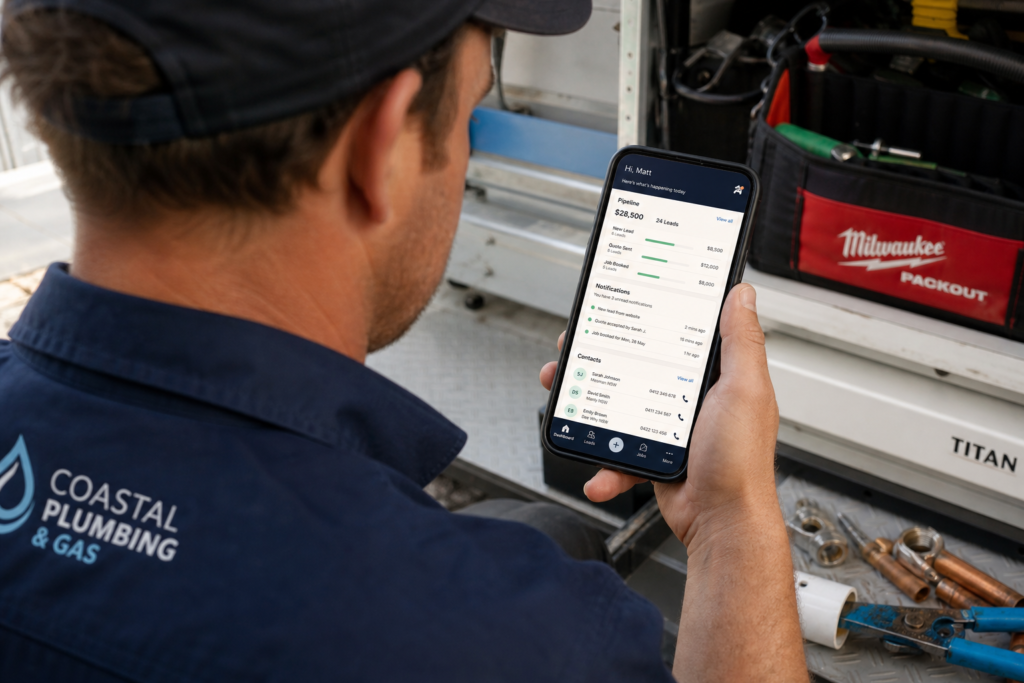
3. Pipeline Visibility
You need to see – at a glance – how many leads are in each stage of your pipeline. How many are new? How many have been quoted? How many need follow-up? How many did you win this month?
Without this, you’re guessing. And guessing leads to feast-or-famine cycles because you don’t see the problem until the phone stops ringing.
4. Automated Follow-Up Sequences
Not every lead is ready to buy today. Some need a bathroom renovation but not until next year. Some are comparing three quotes. Some just got busy and forgot.
A good CRM sends automated follow-up messages at set intervals – a day later, three days later, a week later. Not aggressive. Just enough to stay top of mind without being annoying.
The businesses that follow up 5-7 times close significantly more work than the ones that call once and give up.
5. Review Requests
After a job is done, the CRM should automatically send a review request to the customer. Google reviews are the single most powerful trust signal for local trade businesses. The more 5-star reviews you have, the more your Google Business Profile ranks, and the more people call you.
With a CRM like Tradie Hub, tradies can reply to and manage Google reviews directly from the platform – including responding to negative reviews without having to log in and out of Google.
6. Communication History
Every text, email, and call should be logged against the customer record. When a customer calls back three weeks later, you should be able to pull up their record and see exactly what was discussed, what was quoted, and where things stand.
No more “sorry mate, can you remind me what this was about?”
7. Reporting
At the end of the month, you should be able to see: how many leads came in, where they came from, how many converted, and what revenue they generated. This tells you where to spend more and where to cut.
CRM Options for Tradies in Australia
There are plenty of CRMs on the market. Here’s an honest look at the main ones trade businesses consider.
Tradie Hub
Built specifically for trade businesses. Handles lead capture, automated follow-ups, pipeline management, review requests, and customer communication – all in one platform. It integrates directly with Google Ads, Facebook ads, and your website. The biggest advantage is that it is designed around how tradies actually work, not how a software company thinks they should work. There are two straightforward plans, with unlimited contacts, users and automation on the Grow subscription.
HubSpot
Popular, well-known, and has a free tier. Good for businesses that want to start basic. The downside is that it gets expensive very quickly once you need team access, automations, sequences, and integrations. It’s also built for B2B and tech companies, so the templates and workflows don’t translate directly to trades.
Jobber / ServiceM8 / Tradify / Fergus
These are job management tools, not CRMs. They’re excellent for scheduling, dispatching, quoting, and invoicing. But they don’t handle lead capture, automated follow-up sequences, or pipeline management in the way a CRM should. Some have basic CRM features bolted on, but they’re secondary to the job management function.
If you’re already using one of these for job management, the smart move is to pair it with a proper CRM that handles the front-end sales process.
The Biggest Mistake Tradies Make With CRMs
They buy one and don’t use it.
We see this constantly. A tradie signs up for a CRM, sets it up over a weekend, uses it for two weeks, and then stops because “they’re not good at tech”.
A properly configured CRM runs in the background. Leads flow in automatically. Follow-ups send automatically. Pipeline stages update based on actions. The only thing you need to do is check your pipeline, make your calls, and send your quotes.
If your CRM feels like more work, it hasn’t been set up properly.
How a CRM Changes the Way You Run Your Business
Before CRM
- Leads come in through phone, email, and forms
- You write them down (sometimes)
- You call back when you remember (sometimes)
- You quote and hope for the best
- You have no idea how many leads you got last month
- You don’t know your close rate
- You think marketing “doesn’t work” because the phone isn’t ringing
After CRM
- Every lead is captured automatically
- Instant text goes out within seconds
- You call back from a prioritised list
- Leads that don’t answer get automatic follow-ups
- You see your entire pipeline at a glance
- You know exactly how many leads you got, how many you quoted, and how many you won
- You can prove whether marketing is working because you have the data
The shift isn’t just operational. It’s psychological. When you can see the pipeline, you stop panicking during slow weeks because you know there are 15 quoted leads waiting to come back. You make decisions based on data instead of gut feel.
This is what we mean when we talk about building a system you own.
What Does a CRM Cost?
Monthly CRM costs for trade businesses in Australia typically range from $97-500/month depending on features, users, and the level of automation included. Some platforms charge per user. Others charge per feature set.
The cost of a CRM is almost always less than the cost of the leads you’re losing without one. If a CRM saves you even 5 leads per month at $30 per lead and you close 2 of them at $3,000 each – that’s $6,000 in recovered revenue for a $200/month tool.
The ROI isn’t theoretical. It’s maths.
For a deeper look at calculating marketing return, check out our marketing ROI guide.
Common Questions About CRMs for Tradies
Do I need a CRM if I only get a few leads a week?
Yes. Even at low volume, the leads you do get are valuable. Missing one because you forgot to call back is expensive. And when your volume grows (through ads, SEO, or referrals), the CRM is already in place to handle it.
Can’t I just use my phone contacts?
Phone contacts don’t track pipeline stages, send automated follow-ups, log conversations, or generate reports. They’re a list of names, not a system.
Will a CRM replace my job management software?
No. A CRM manages the front end (leads and sales). Job management software manages the back end (scheduling, dispatching, invoicing). They do different jobs. The best setup is using both, with the CRM handing off won jobs to your job management platform.
How long does it take to set up?
A basic setup can be done in a day. A full setup with automations, integrations, and pipeline configuration usually takes 1-2 weeks. The key is getting it configured properly from the start so you don’t end up treating it like a glorified spreadsheet.
What if my team doesn’t use it?
This is a leadership problem, not a technology problem. If the CRM is set up correctly with automation, the manual work is minimal. Make it part of the daily workflow – checking the pipeline in the morning, updating lead statuses after calls – and it becomes habit within a few weeks.
Can a CRM help with repeat business?
Absolutely. A CRM stores every customer’s history. So when it’s time for an annual service, a follow-up check, or a new project, you can reach out to past customers automatically. This turns one-off jobs into recurring revenue.
What data do I need to move from my current system?
At minimum: customer name, phone, email, and job history. Most CRMs have import tools that accept CSV files. If you’re moving from another CRM, the process is usually straightforward. If you’re moving from a notebook or a spreadsheet, that’s fine too – but now is the time to go digital.
Is my customer data safe in a CRM?
Reputable CRM platforms use encrypted data storage and comply with Australian privacy requirements. Your data is far safer in a cloud-based CRM with proper security than in a notebook in the cab of your ute.
The Bottom Line
You can have the best ads, the best website, and the best SEO in your market. But if your leads aren’t being tracked, followed up, and managed – you’re building on sand.
A CRM is the foundation. Not the last thing you add – the first.
If you want help figuring out which CRM setup is right for your trade business – and how it fits into a broader growth strategy – book an Impact Roadmap Session. It’s a paid working session where you walk away with a documented strategy, not a sales pitch. And if you decide to work with us, we credit that back, so essentially it costs you zilch.