Quoting Tool for Tradies: The Job Quoting App Built for How You Work
It makes sense to keep all your tools in one place, right? Send professional quotes in minutes - from site to inbox - and win more jobs.
Tradies shouldn’t have to choose between quoting fast and quoting properly. With our integrated quoting tool inside the Tradie Hub app, you can quote on-site, get quick internal sign-off, and send a branded proposal to your customer in just a few taps.
If quoting is slowing you down, here’s what a better system looks like:
1. Start the Job
Fire up the Tradie Hub mobile app and begin a new quote straight from the contact card. Whether the lead came through an ad, form, or phone call, everything’s ready to go—no retyping, no guesswork.
Select or create your customer
Add job title and description
Set days on site or project duration
2. Add Materials, Labour & Site Details
Use custom inputs to build your quote quickly, with smart defaults and reusable templates to save time.
Input quantities for materials (roofing sheets, safety railing, fixings, etc.)
Add labour breakdowns or use preset bundles
Set margins on materials and labour
Enter optional extras defined by you
The quoting tool is fully customisable to suit your trade, pricing model, and job structure.
3. Calculate & Generate the Quote
The system auto-calculates totals, margins, and tax, then generates a clear and professional document.
Line item breakdowns with optional inclusions/exclusions
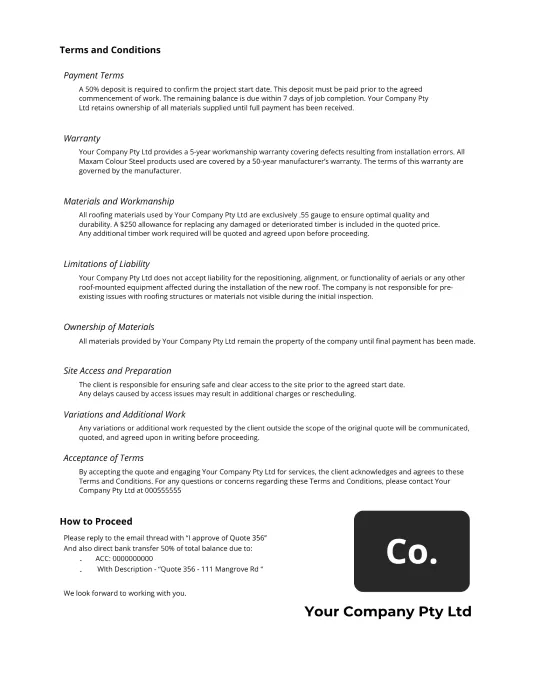
Custom terms and conditions
Your logo, brand colours, and contact details
Editable templates for different job types or levels of service
Whether it’s a roof replacement, kitchen fit-out or full rewire, your quote looks sharp and consistent every time.
4. Internal Approval
Want an extra set of eyes on the numbers? No problem. Quotes can be pushed to your internal review channel (like Slack) for quick sign-off.
Review by project manager or estimator
Approve or request edits instantly
Keeps your quoting process consistent and controlled
5. Send to the Customer
With one tap, the approved quote is sent straight to the client’s inbox. The email includes a summary, branded PDF, and simple call-to-action. Your client gets everything they need within minutes.
🎥 See Quotie in Action
Want to see exactly how it works? Watch this short walkthrough to see how a quote goes from input to inbox in under 5 minutes.
Why It Works for Tradies
⚡ Save hours each week on paperwork
📲 Quote directly from site—no more late nights
💼 Stay consistent with pricing and branding
📈 Close more jobs, faster
Whether you’re quoting roof repairs, renovations, or recurring maintenance, this tool gets you from enquiry to acceptance without the back and forth.
Ready to Quote Like a Pro?
We’ll set everything up, tailor it to your pricing, and walk you through how to use it on your next job.
Get Started Form
"*" indicates required fields
Frequently Asked Questions
Can I update pricing regularly to keep the quoting tool accurate?
Yes. You can update material costs, labour rates, and margin settings at any time to reflect current supplier pricing and job requirements.
Do I need a Tradie Hub subscription to access the quoting tool?
Yes. The quoting tool is included in the Grow Plan of Tradie Hub. This plan is built for businesses that want automation, quoting, messaging, and more in one system.
Can my whole team use the quoting tool?
Yes. Tradie Hub allows unlimited users, so everyone from office staff to site supervisors can access the quoting system, depending on their role.
Is the quoting tool mobile-friendly?
Yes. It runs directly through the Tradie Hub mobile app, making it easy to create and send quotes on site—no need to wait until you’re back at the office.
Can I customise the quote layout and branding?
Yes, of course. Our team sets up your quoting layout, branding, and templates based on your materials, margins, and preferred format.
Can I send different quote options for the same job?
Yes, we can set up multiple quote options (e.g. room types or service packages), but this requires a more advanced setup. We’ll start with your standard quote first, then layer in options. Multi-option quoting incurs a higher setup cost.
What happens after a quote is approved?
Once approved, the quote can move to a “Job Won” stage in Tradie Hub CRM. From there, your team takes over to deliver on the quoted works.