How UX and SEO Work Together for Tradie Websites
If you are a tradie and your website is getting traffic but not enough calls, enquiries, or booked jobs, this is not bad luck. It is usually a disconnect between UX and SEO.
Most trade websites are built with one goal in mind. Rank on Google. Others are built to look good but ignore how customers actually use them.
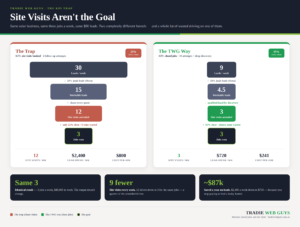
The problem is this. SEO gets people to your website. UX decides whether they stay, trust you, and contact you.
When those two are not aligned, your website quietly leaks work every day. This article breaks down exactly how UX and SEO work together for trade websites, why treating them separately causes problems, and what to do instead.
What UX and SEO Mean for Trade Websites
Before we connect the dots, it helps to be clear on what each term really means in the context of trade businesses.What SEO Does
SEO helps your website appear in search results when someone types things like:
- plumber near me
- emergency electrician
- builder in [suburb]
SEO focuses on keywords, pages, structure, speed, and relevance so Google understands what you do and where you work.
What UX Does
UX, or user experience, focuses on what happens after someone lands on your site:
- Can they immediately tell what services you offer?
- Is it easy to find your phone number?
- Does the site make you feel professional and trustworthy?
- Can they complete a form quickly on mobile?
For trade websites, UX is about reducing confusion and friction so a visitor can act without burning too many calories.
UX vs SEO: Why This Is the Wrong Way to Think About It
A common mistake is treating this as UX vs SEO, as if you have to choose one or the other.
That mindset creates problems:
- SEO-only websites rank but do not convert
- Design-led websites look good but are invisible in search
- Visitors arrive but leave quickly, confusing Google and hurting rankings
The reality is simple.
UX and SEO are not competing priorities. They are dependent on each other.How UX Impacts SEO in the Real World
Google does not just look at keywords anymore, here is how UX impacts SEO in practical terms for trade websites.Bounce Rate & Engagement
If someone clicks your site and leaves immediately because:
- the page is cluttered the
- text is hard to read
- they cannot see your services clearly
Google sees that as a poor experience and may reduce your visibility over time.
Time on Page
Good UX keeps people reading, scrolling, and interacting. That tells Google your page is useful.Mobile Experience
Most trade searches happen on mobile. If your buttons are hard to tap or forms are painful to use, users leave. Rankings follow.Page Speed
Slow websites frustrate users and are a direct ranking factor. UX and SEO overlap here completely.SEO and UX Design Must Work Together
Strong seo and ux design means building pages that satisfy both search engines and humans. For trade websites, that means:
- Clear service-focused headings
- Simple language, not marketing waffle
- Obvious calls to action
- Logical page flow that answers questions in the right order
UI, UX and SEO: How They Connect
SUI, UX and SEO are often mentioned together, but they serve different roles.
- UI is how the site looks and feels
- UX is how the site works and flows
- SEO is how the site is found
When ui ux and seo are aligned:
- The design supports clarity, not distraction
- The structure supports search engines and users
- The experience builds trust quickly
When they are not aligned:
- Important content is buried
- Calls to action are unclear
- Rankings suffer because behaviour signals are weak
Balancing UX and SEO on Trade Websites
Examples of good balance:
- Writing headings that include keywords but still sound human
- Structuring pages for SEO while keeping them easy to scan
- Using internal links without overwhelming users
- Adding content depth without making pages feel heavy
UX and SEO Best Practices for Trade Websites
Here are proven ux and seo best practices that consistently work for trade businesses.Start With Intent
Every page should match a clear search intent:
- emergency
- service-specific
- location-based
- project-focused
Make the Next Step Obvious
- Phone number visible.
- Buttons clear.
- Forms short.
Write for Skimmers
Most visitors scan. Use:
- clear headings short
- paragraphs simple
- language
Build Trust Early
Logos, licences, reviews, photos of real work. UX builds credibility fast.Optimise for Mobile First
If it does not work well on a phone, it does not work.Why Treating UX and SEO Separately Costs Trade Businesses Work
Many trade businesses invest in SEO and then wonder why enquiries stay flat, while others redesign their website and suddenly lose rankings altogether.
Both problems usually come from treating UX and SEO as separate things, when SEO without UX brings traffic that does nothing, and UX without SEO builds a shopfront on an empty street.
Getting UX and SEO Right for Your Trade Website
At Tradie Web Guys, we specialise in building trade websites where UX, UI and SEO are designed together, not bolted on later. We focus on how real trade customers search, think, and decide, then build systems that support growth, not just traffic.
If your trade website is getting views but not enough enquiries, or you are planning a new site and want it done properly from the start, our team is here to help.